The official store page promises Steam Market trading, but players cannot list anything. What the game data says is tradable, and what is confirmed.
Deskrawl Steam Market and Auction House: What Can You Actually Sell
The Auction House is not broken — it is far narrower than the store page implies. In the shipped build, 157 of 553 item assets carry a Steam inventory definition ID, and those 157 are exactly four things: 8 Divine pieces, 48 Black Mist Legendary pieces, 78 set runes and 23 Legendary Reins. Not one material, gem or fish has one either — which is why "I tried it and can't list anything" is the most common line in the Steam discussion hub.
All figures below come from the game's own data tables in the 1.0 launch build (2026-09-28). Live was already on 1.0.0g (2026-09-29) when this was checked, so treat the lists as launch-era, one patch stale.
What the store page promises versus what the build contains
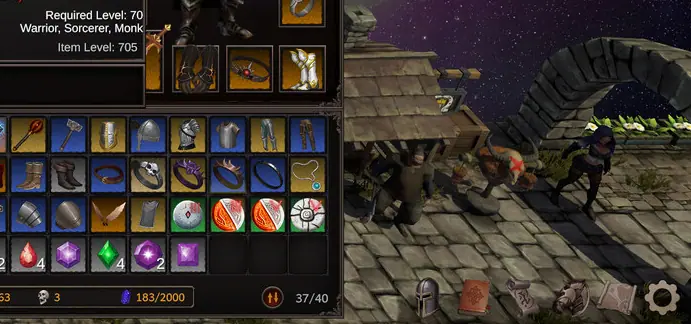
The only official description of this feature on Steam is one sentence, in the "Trading" block — the fourth of five headings in the store page's about_the_game field:
Official source: Steam store page — Deskrawl: Idle ARPG
"Trade valuable equipment, materials, and minions with other players on the Steam Market"
That is the entire official commitment. A full-text scan of all 26 announcements from 2026-05-18 to 2026-09-29 returns one hit, and it is about the future: the 0.1.13 notice of 2026-06-27 says the new online-character architecture "paves the foundation to build future social and trading systems." Read it against the shipped data and the gaps are specific:
| Store page promises | Present in the 1.0 build |
|---|---|
| Equipment | Yes — 56 pieces (8 Divine, 48 Black Mist Legendary) |
| Materials | None. All 29 material assets have a Steam item ID of 0 |
| Minions | Indirectly. SlaveData has no Steam inventory field at all — what trades is the Rein that unlocks a minion |
| Never mentioned | 78 set runes and 23 Legendary Reins — the bulk of the tradable set |
The two most-searched words on that store page, "materials" and "minions", are exactly the two a player will fail to list. That mismatch, not a bug, produces the "nothing works" reviews.
The tradable set: 157 items, and the field that marks them
Tradability is not a boolean anywhere in the game. It is implied by two integer fields on the item asset class ItemData — SteamItemDefId and BlackMistSteamItemDefId (ItemData.cs:75,77). Non-zero in either means a Steam Inventory definition exists; zero in both means the upload slot rejects the item.
| Tradable group | Item type | Rarity | Steam ID field | ID range | Assets |
|---|---|---|---|---|---|
| Divine equipment | Equipment | Divine | SteamItemDefId |
1000–1007 | 8 |
| Black Mist Legendary equipment | Equipment | Legendary | BlackMistSteamItemDefId |
3000–3047 | 48 |
| Set runes | Rune | RuneSet | SteamItemDefId |
4000–4077 | 78 |
| Boss Reins | Consumable | Legendary | SteamItemDefId |
2000–2022 | 23 |
Every other category scores zero: all 36 gems, all 29 materials, all 11 fish, all 10 random-equipment assets, and 64 of the 87 consumables. The ItemType enum does include a Commodity = 7 member that looks like a trade flag, but all 11 assets using it are fish with an ID of 0 — the type is not the marker. See the item rarity guide and set runes.
Runes are the sharpest case, because only one rune rarity trades. LootConfig.RuneDrops weights them Common 0, Uncommon 56, Rare 43.5, Legendary 0, Divine 0, Set 0.5 out of 100 — and all 78 tradable rune assets carry ItemRarity.RuneSet, that 0.5 sliver. The other runes drop but cannot be listed, and the Set tier is separately hard-gated: LootConfig.MinSetDifficulty is Inferno1, the same gate as Divine.
The rule the game gives you, and how to check it yourself
The Auctioneer NPC runs a quest whose dialogue is the only place the game states the rule. The asset Quests/QuestAuctionTradable resolves five placeholders: {0}→UI.Tradable ("Tradable", cyan), {1}→UI.BlackMist ("Black Mist", purple), {2}→Rarity.Divine ("Divine", gold), {3}→UI.SetRunes ("Set Runes", green), {4}→Rarity.Legendary ("Legendary", orange). Filled in, the quest line reads: "Welcome to the Auction House! Only items marked Tradable in their tooltip can be traded here. For now, that's just the rarest finds: Black Mist and Divine equipment, Set Runes and Legendary Reins; some only drop on the higher difficulties."
That matches the asset scan exactly — same four groups, same rarity tiers — and it gives you a self-check that needs no spreadsheet: hover an item, look for Tradable in its tooltip. Not there means it cannot be listed. Higher difficulties gate several of these drops, so the Nightmare and Inferno unlocks are part of the trading progression.
Why you only see empty slots
The in-game panel is not a storefront. Its server response, AuctionListResponse, carries only three fields: ok, enabled and your own listings[] — no browse field anywhere. The "Listed Items" tab shows your listings and nothing else. The in-game help string states how the system actually works:
Official source: game UI table,
UI.Auction.Help
"Listed items leave the game and sit in your Steam Inventory, where you can trade or sell them. Place a tradable item in the slot and press Upload - up to 8 at a time. Items traded to you appear under Received Items. Withdrawing or claiming sends the item to your mailbox after a short cooldown."
Browsing happens on the Steam Community Market page for the app — the answer one player gave another who was stuck on exactly this. From a thread of 13 replies, one with a single clear complaint about empty slots:
"What market ? I don't get how that market in game works. When I click on it I only see empty slots with no way of checking listed items from people."
Official source: Steam discussion — "Legendary Reigns"
The same thread indicates the system is live: its opening post asks "How can so many be available on the market already?" and a reply counts "there are 25k players, there are like 100 mounts on market." That reply's scope — "mounts" — is narrower than the data. Divine equipment and set runes are listed too; Reins are just the most plentiful. A second, two-reply thread hits the same wall: its opening post asks what the Auction House is even for, having tried to list everything and finding nothing listable, gems included. The first reply answers it — the Legendary coachman can be listed.
Official source: Steam discussion — the Auction House thread
Why a listing gets refused
Four refusal strings ship in the UI table:
| UI key | English text | Meaning |
|---|---|---|
UI.Auction.NotTradable |
"This item cannot be traded." | Both Steam ID fields are 0 |
UI.Auction.NoUpgraded |
"Upgraded or socketed items, and runes that have been equipped, cannot be traded." | The item was modified |
UI.Auction.OnlineOnly |
"Only online characters can trade." | Your character is offline |
The online-character rule catches new accounts hardest. QuestAuctionTradable has an empty Requirements list, but the server-side gate is separate, and existing characters were auto-converted to offline when 0.1.13 shipped. The online mode guide covers how to check which you have.
The game warns you before each: "Upgrading makes this item untradable forever." / "Adding a socket makes this item untradable forever." / "Revealing makes this item untradable forever." / "Equipping this rune makes it untradable forever."
See the +1 to +10 chance table and gem and socket costs. The practical rule is simpler: if you plan to list a Divine or Black Mist piece, do not roll it.
One more trap. Life Skill 9, Equipment Auto-Sell, costs 1,500 gold and sells equipment "of the selected rarities the moment the carriage picks it up" — a range that includes tradable gear. A filter set to sweep your drops is how a tradable item vanishes into a merchant sale. See the Life Skills guide.
What is not officially published
- Whether the market is enabled for everyone right now. Both
AuctionListResponseandSteamSyncResponsereturn anenabledflag, and the UI ships a matching "The auction house is currently unavailable. Please check the announcements." message — a global kill switch, published nowhere. - A listing fee. One Chinese thread reports a 1,000,000-gold threshold to unlock the Auction House. There is no such field in the shipped data —
GameConfighas no auction, fee or listing-cost key, and the Auctioneer quest asset has an empty requirements list. Treat the figure as community-reported and unconfirmed. - Any price or revenue figure. No fee schedule, no pricing guidance. Prices on fan wikis are scraped data, not official values.
What to do right now
- Sweep your inventory for tooltips containing the literal word Tradable. That is the whole eligibility test.
- If nothing qualifies, you are gated on drops, not on a bug.
LootConfig.RuneDropsputs aMinDropLevelof 40 on your character level and aDropChanceof 0.02 per roll — it is not boss-gated, and itsMiniBossChanceMultiplierof 0.75 is a reduction, so a miniboss is a worse rune source than trash. Divine gear and Set runes both needInferno1. The drop rate guide has the config truth. - Turn carriage auto-sell off for your top rarity tiers before going AFK, and make sure you are on an online character — trading is gated on both.
- Browse listings on the Steam Community Market page, not in the in-game panel.
- If the panel says "The auction house is currently unavailable," that is the server-side flag, not your account. Ask via the Discord or QQ group linked from the store page, or email [email protected]. The patch notes archive is where to watch for a change.
For the launch reception, see Is Deskrawl Worth It?.
Frequently Asked Questions
Can I sell gear for real money? The game never says. The store page promises trading "with other players on the Steam Market," and the in-game help says items "sit in your Steam Inventory, where you can trade or sell them" — real money is Steam's side, not a game feature. No price list, fees or earnings guidance has been published.
Why does my tooltip not have the Tradable tag? Because the item has no Steam definition ID. Only the four tradable groups carry one; everything else is permanently unlistable.
I listed something and it is gone — where is it? Uploading moves it into your Steam Inventory. If someone buys it, proceeds go to your Steam wallet; to get it back, withdraw it to your in-game mailbox after the short cooldown the UI mentions.
More Deskrawl: Idle ARPG Guides
The 1.0 release raised the cap from 35 to 70, expanded the talent tree, reworked Life Skills and added a Paragon tab. Demo saves are wiped.
Demon Skulls are the only entry currency, and the rule is odd: entry only checks your balance, and the skull is deducted after you clear the stage.
Deskrawl has exactly three difficulties. Inferno multiplies enemy HP sixfold and is the only tier that drops Divine gear, rune sets and Mythic content.
The real Deskrawl loot table from the 1.0 build — 87-95% no-drop rolls on trash mobs, chest contents, and what patch 1.0.0g actually changed.
The verified Deskrawl +10 upgrade table: four guaranteed levels, then 75%, 50%, 40%, 30%, 20% and 10% — plus the material each slot needs.
The 68 official Deskrawl stat affixes and the per-slot roll pools, plus the 11-vs-12 equipment slot puzzle solved: rings occupy two slots.
Exact Deskrawl socket costs from the 1.0 build: 100 ore plus 400 gold per item level, level 30 to unlock, and the five slots that cannot be socketed.
There is no gold map in Deskrawl. Gold comes from offline mob rolls scaled by difficulty bonus, Life Skills gold find, and the lucky wheel.