Why Deskrawl's RAM use spikes, what patch 1.0.0g cut by about 130 MB, and the low-spec settings that matter for an always-on desktop game.
Deskrawl Memory Usage: the 130 MB Cut and What to Turn Down
Deskrawl's developer has published exactly one memory number in the game's entire life, and it is a subtraction rather than a total: patch 1.0.0g on 29 September 2026 says memory use went down by about 130 MB. No before figure, no after figure, no frame rate anywhere in the official record. The store page, meanwhile, asks for 4 GB of RAM at minimum and recommends 16 GB — a 4× spread on the exact thing this page is about. Everything below is that one official line, the store page's two columns, or a reading a player posted themselves, and each section says which one it is.
This page covers how much memory Deskrawl actually takes, whether it gets in the way of the work you are doing on the same machine, what to turn down to shrink it, and what computer is genuinely enough. Four things decide all of it:
- The 130 MB line — a saving with no starting point attached, and the developer has never filled in the missing half
- The two store columns — 4 GB minimum against 16 GB recommended, the widest gap on the store page
- The settings menu — three quality presets, V-sync off at every one of them, and a frame-rate cap you have to pick from a dropdown
- The window — a small panel parked on your desktop all day beside your browser, not a session with a loading screen
The 130 MB figure is the developer's own patch note. The Minimum and Recommended pair was read from the Steam store page on 1 October 2026, and the Chinese store page carries the same two columns. The quality-preset and settings values come from the game's own shipped settings (1.0 launch build, 28 September 2026); patch 1.0.0g changed none of them. Every memory reading further down is a player report from the Steam forums with no official confirmation, and the PC it was taken on is unidentified.
How much memory it actually takes
The 130 MB line, and what it leaves out
The patch bullet, verbatim, from Patch 1.0.0g — Various Improvements and Fixes, 29 September 2026:
"Reduced RAM consumption by about 130 MB (more RAM improvements coming in next patches)."
Two phrases in that sentence matter more than the number does. "About" means 130 MB is rounded and the real saving is somewhere near it, not exactly it. "Coming in next patches" is a promise, not a delivery — as of 30 September 2026 it was still the newest announcement the developer had made, so the follow-up work had not landed. The patch archive is the place to check whether it has since.
| What you want to know | What the developer has published |
|---|---|
| How much did 1.0.0g save? | About 130 MB, hedged with "about" |
| Before and peak usage | Officially not published |
| What frame rate does it run at? | Never published |
So: 130 MB is a saving with no starting point attached, and you cannot turn it into a number you can plan your day around. You still do not know what it started from. Any page claiming Deskrawl "uses 1.5 GB" is quoting a player, not the developer — check whether it says so.
The game does ship its own performance tester, and the record it would write lists everything you would need to settle the question: screen width, screen refresh rate, V-sync, anti-aliasing, graphics API, system memory in MB and graphics device name. It holds zero recorded runs. The tool is there; nobody ever ran it and published the output.
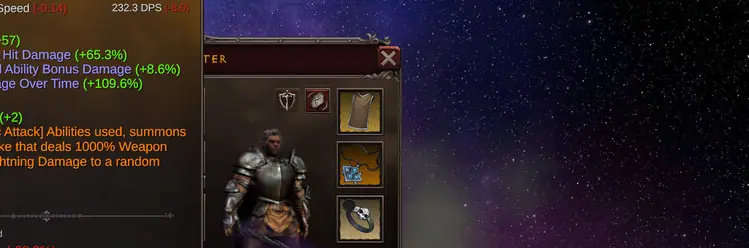
So: nobody can quote you a frame rate for this game, the developer included. If you need a figure for your own machine, measure it yourself — the live overlay in the picture above is the fastest way.
What players actually measured
Community-reported, not official, and the only RAM readings that exist anywhere. The original post is in Traditional Chinese, the numbers are as posted, and the poster gave no CPU, no GPU, no total system RAM and no Windows build — so you cannot scale these onto your own machine.
| Reading | As reported |
|---|---|
| Before "today's update" | 650 MB |
| After that update | 2100 MB |
| After a reload, per a quoted reply | still ~1800 MB |
| Once idling inside a map | ~2500 MB |
| For one replier | fixed by deleting and re-downloading |
Player source: Steam discussion, thread id 592942834747724407
Two things in that table are worth keeping. The number kept climbing after the game had already launched — 2100 MB, then ~1800 MB after a reload, then ~2500 MB once a run was actually under way. That is how a resident background process behaves, not a one-off allocation at startup. And the one player who fixed theirs did it by deleting and re-downloading the game, which points at stale local data rather than a leak.
So: if your RAM jumps after an update, re-downloading is the cheapest thing to try before you go hunting for a leak. Treat ~2500 MB as the ceiling one player saw on an unidentified PC, never as the number your machine will show.
The two official numbers disagree by 4×
4 GB minimum against 16 GB recommended is the widest gap anywhere on the store page. Most games spread two to three times between the two columns; this one spreads 4× on RAM while the graphics card jumps a single 2013-era generation. A small window of sprites costs nothing on the GPU, but your browser, your editor and your video call are running underneath it for eight hours.
So: the memory row on the store page is describing your whole desktop, not the game. The full two-column table is at the bottom of this page; if you plan to leave Deskrawl running while you work, the recommended column is the one that matches your day.
Whether it gets in the way of your work
Deskrawl is a resident game, not a peak-performance one. It is a transparent panel parked at the bottom of your screen — a long-lived process competing with your browser for eight hours, not a session with a loading screen and an exit button.
So: judge it as a background app, not as a game. The question is not "how fast does it render" but "what does it cost me while I am working", and the answer is a flat monthly-looking number that keeps climbing, not a spike that clears.
The window and stability record before launch day shows what the team was actually fixing — five fixes in six weeks, all about the window or the save, none about memory:
| Date | Version | Window or performance change |
|---|---|---|
| 2026-06-16 | 0.1.9 | Resizable width and drag; Boss Key moved to Alt+B |
| 2026-06-17 | 0.1.9a | Resolution Settings; Reset to Default; drag across monitors |
| 2026-06-18 | 0.1.10 | Auto-save reliability raised against crash data loss |
| 2026-06-22 | 0.1.12a | Boss Key rebindable; fixed Boss Key not working |
| 2026-07-17 | 0.1.13f | Fixed ultrawide UI cropping; fixed save corruption |
| 2026-09-29 | 1.0.0g | RAM down about 130 MB |
So: every "Deskrawl is badly optimised" complaint from before September is about a build that has had six patches since. What is left is the resident memory cost and the settings below.
The lag players report is usually a resolution bug
What players call lag is often a screen-setup problem, not a slow game. With two monitors, one player reported that "the only available resolutions are those of the smaller screen" (thread); another found the window stayed on the old display after swapping monitors, leaving the buttons at the bottom of the panel unreachable.
So: before you blame memory, check whether Deskrawl is even offering the resolution your desktop is running. A panel rendering at the wrong size looks exactly like a game that cannot keep up.
Click the drag widget to reset the window position — shipped officially in 0.1.9a. Windows Shift+Arrow moves the window between monitors; one player got unstuck that way, while another on three monitors never had the problem at all. Set Resolution explicitly in Settings → Graphics — ultrawide cropping was a real bug through 0.1.x and was fixed only in 0.1.13f.
When it crashes, one player's dump says where
In a separate thread a player analysed their own crash dump, having fed it to an AI. It is community analysis of a player-supplied file — the developer has published nothing on crashes at all — but the shape is specific: a Windows access violation, error 0xC0000005, meaning the game read from an address it had already released. The fault sits at a fixed offset inside the graphics driver (0x1B4EBA) while the game was loading assets in the background across several worker threads. The two heaviest modules in the dump are 37 MB and 68 MB, which lines up with the shipped Unity 6000.3.6f1 Windows build.
Player source: Steam discussion, thread id 594068631729518999
That reads as a graphics-resource lifetime race during loading, not as your machine running out of memory. The next poster in the PC-crash thread puts it the other way round: "it doesn't even consume much resources so there's likely something in your PC that's making it crash."
So: a crash that takes the whole machine down is a different problem from a heavy one. Turning down the settings below will not fix it — read Windows Event Viewer, because the dump says the game was not out of memory.
How to turn it down
The lowest preset is called "Extremely Low", not "Low"
The lowest quality option is not called "Low" anywhere in the menu. It is labelled "Extremely Low", which is why hunting the dropdown for a "Low" preset finds nothing and players conclude there is no low setting. There are three presets: Extremely Low, Medium and Ultra. Read from the 1.0 launch build (2026-09-28); patch 1.0.0g changed none of them.
| What it changes | Extremely Low | Medium | Ultra |
|---|---|---|---|
| Shadow quality | 0 — off | 2 | 2 |
| Main light casts shadows | 0 — off | 1 | 1 |
| Anti-aliasing (MSAA) | 1 — none | 1 — none | 8 — smooth |
| Texture detail | 2 — coarsest | 1 | 0 — full |
| Render scale | 1.0 | 1.0 | 1.0 |
Extremely Low is the only preset that turns off ambient occlusion, the soft darkening in corners and behind objects. The default setup applies three background rendering effects; the low-quality setup applies two.
And render scale reads 1.0 on every preset, so there is no internal-resolution lever anywhere in this game. Ultra and Extremely Low draw the same number of pixels; the only things that differ are shadows, anti-aliasing and texture detail.
V-sync is set to off at every quality level, so frame pacing rests entirely on the frame-rate setting. That setting defaults to 60, and the "Unlimited" option is not a number at all — it is the raw uncapped value. An uncapped Deskrawl renders continuously while your browser does the same.
So: capping the frame rate is not a quality-versus-speed trade here, it is the only limiter you have. Leave it on Unlimited and the game burns CPU and GPU next to your other work for as long as it is open.
The settings panel, and the one key that matters most
The settings panel wires up seven sliders (master, music, SFX, game width, brightness, UI scale, HUD scale), four dropdowns (language, resolution, quality, frame rate), three toggles (fullscreen, always on top, background audio) and a button row. There is no V-Sync switch, no shadow slider, no render-scale slider and no density control.
So: the whole menu is fifteen controls and none of them is a memory cap. If you are looking for the setting that makes Deskrawl smaller, it does not exist — the only levers are frame rate, window width, and whether it is on top of your other windows.
The control that matters for a background game is the Boss Key, defaulted to Alt+B in patch 0.1.9 and rebindable since 0.1.12a. The game's own tooltip reads: "Press {0} to instantly hide the window and mute audio. Press again to restore. Works even while the window is unfocused." One keystroke and the process goes dark and silent while the farming continues. The window-width slider runs from 0.5 to 1.0 and takes the panel to half width.
A low-spec checklist
| Action | Where | What it does |
|---|---|---|
| Press Alt+B, or rebind it | Boss Key | Hides the window and mutes audio while unfocused |
| Set Quality to "Extremely Low" | Graphics | Kills main-light shadows, drops ambient occlusion |
| Drag Window Width down | System | Runs 0.5–1.0; below the narrow threshold the HUD repositions |
| Cap Frame Rate, not Unlimited | Graphics | With V-sync off, this is the only frame limiter |
| Turn off Always on Top and Background Audio | System | Stops unfocused compositing and audio |
| Reinstall rather than hunt a phantom leak | Steam → Verify | One player fixed a post-update spike this way |
What you will not find in that menu: enemy density, shadow distance, render scale, or a memory cap. If the process has to cost less than this, closing it is the real lever — offline earnings covers what you bank while it is closed, and Steam Deck has the Proton setup for the handheld case.
So: run the first two rows if you only do two. Everything else is a smaller slice of the same cost.
What machine is actually enough
Both store columns, as published:
| Requirement | Minimum | Recommended |
|---|---|---|
| OS | Windows 10 64 bit | Windows 10 64 bit |
| Processor | Intel Core i3 | Intel Core i5 |
| Memory | 4 GB RAM | 16 GB RAM |
| Graphics | GeForce GT 730 or Radeon R7 240 | GeForce GTX 660 or Radeon R9 270 |
| Storage | 5 GB available | 10 GB available |
Read the two columns against each other and the memory row is the one that stands out. A 4× RAM gap is wider than anything else on the page, and the graphics row barely moves — the recommended tier only jumps one 2013-era generation, from a GeForce GT 730 or Radeon R7 240 up to a GeForce GTX 660 or Radeon R9 270. A tiny window of sprites costs almost nothing on the GPU; a browser, an editor and a video call underneath it cost plenty on RAM.
So: the recommended column is the one that describes your actual desktop, and the minimum column describes a machine that runs Deskrawl and nothing else. If your day includes anything else open, plan against 16 GB.
On an 8 GB machine, the 4 GB minimum tells you nothing about whether the 130 MB saving hurts, because the saving is real and the baseline is not published. What you can actually control is the frame-rate cap and the window width.
So: on 8 GB, cap the frame rate, narrow the window, and treat 130 MB as the only saving anyone can prove. The full hardware picture — release date, price, platform support — is on the release date and system requirements guide.
FAQ
How much RAM does Deskrawl use? Officially not published. Patch 1.0.0g removed about 130 MB with no baseline. The only official guidance is the store pair: 4 GB minimum, 16 GB recommended.
Is Deskrawl optimized? Directionally, and it says so — the 1.0.0g bullet ends "(more RAM improvements coming in next patches)". That is a promise, not a delivery.
Will running it all day cost me my save? Save-loss reports are a separate issue: Deskrawl Save File and Disappearing Items. Patch 0.1.10 raised auto-save reliability "to avoid lose all progress when game crashes".
Does it need a good GPU? No. Minimum is a GeForce GT 730 or Radeon R7 240, both 2013–2014 entry cards; recommended moves one generation to a GTX 660 / R9 270. The card is the cheapest part of the requirement list.
Why did my memory jump after an update? One player reported 650 MB going to 2100 MB after an unnamed update; a reply said a reinstall fixed it. Unconfirmed officially, but the cheapest thing to try.
Does low FPS stop the farming? No. The game advances its simulation on a fixed 0.02 second step — 50 ticks per second, whatever frame rate your machine manages. Low FPS is cosmetic; lost progress is not.
Related Guides
- Deskrawl Release Date, Price and System Requirements — the rest of the hardware picture.
- Deskrawl Patch Notes: Every Official Update — when the promised memory work lands.
- Deskrawl Offline Earnings: The 8-Hour Cap — the alternative to leaving it resident.
- Deskrawl Save File and Disappearing Items — what a crash costs.
More Deskrawl: Idle ARPG Guides
Deskrawl class builds compared without a tier list: talent counts, weapon pools, socket limits and the exact gold each class should spend first.
The 1.0 release raised the cap from 35 to 70, expanded the talent tree, reworked Life Skills and added a Paragon tab. Demo saves are wiped.
Demon Skulls are the only entry currency, and the rule is odd: entry only checks your balance, and the skull is deducted after you clear the stage.
Deskrawl has exactly three difficulties. Inferno multiplies enemy HP sixfold and is the only tier that drops Divine gear, rune sets and Mythic content.
The real Deskrawl loot table from the 1.0 build — 87-95% no-drop rolls on trash mobs, chest contents, and what patch 1.0.0g actually changed.
The verified Deskrawl +10 upgrade table: four guaranteed levels, then 75%, 50%, 40%, 30%, 20% and 10% — plus the material each slot needs.
Locates the final boss, lists entry needs and gives a clear plan to beat him without wasted runs.
All three Deskrawl fishing lakes, all 12 catches in each, the 50 percent empty rate, and the one Rein that only comes out of water.